Today I’m publicly releasing a project I’ve been working on for a while: FreeFall 800. FreeFall 800 is a local first, open source firmware project, that replaces the factory firmware that comes on the Masterbuilt Gravity 800 smoker grill.
A year ago I was in the market for a new grill, and ended up purchasing a Masterbuilt Gravity 800 charcoal smoker grill. The grill itself has been great. However, like most “smart” devices, it has one fatal flaw: Without the internet, manufacturer’s servers, and their mobile app, you cannot make use of any of the “smart” remote control or monitoring features.
FreeFall 800 aims to fix that. Once you replace the factory firmware with FreeFall 800 the grill will locally serve its own web app you can access from any phone or computer. This web app gives you essentially all the same remote control and monitoring features you get from the Masterbuilt app, but without any dependency on the internet or someone else’s servers. FreeFall 800 currently supports:
- Monitoring the chamber and probe temperatures, with live plotting of temperatures and fan speed, and downloadable history
- Settable timer and probe target temperatures, with audible alarm
- PID-controlled set temperature, with tunable gains
- Option to disable the lid switch interlock that normally stops the fan when the lid is open
- Thermocouple and thermistor calibration, initially migrated from factory firmware calibration
- Supports both standalone WiFi access point mode and joining your home network, with mDNS for automatic host name resolution
- Over-the-air firmware updates
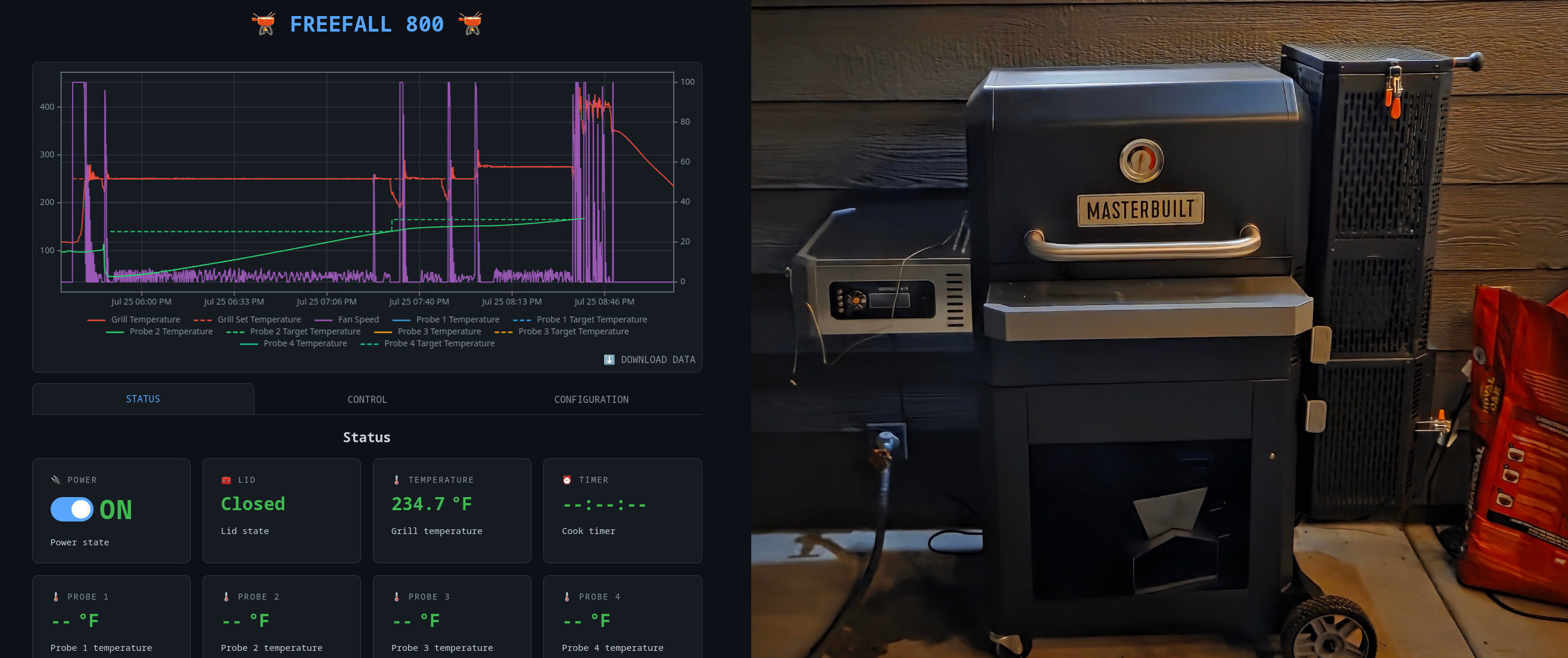
I started this project when I needed to repair the power cord, which had been pulled out of the controller. Taking apart the controller, I quickly found that not only was it using the popular ESP32-WROOM-32UE wireless MCU module, but the programming header for it was easily accessible on the back of the controller board. That was the point at which I knew I needed to reverse engineer this thing and write my own firmware. I will go into the reverse engineering in a separate post, but after a couple months of tinkering my custom Rust based firmware provides almost all the features of the original firmware, and I am releasing the whole thing under the GPL v3 license.
Getting Started With FreeFall 800
First, a few warnings: It is possible the FreeFall 800 firmware will damage your controller or grill. Only install this on your Gravity 800 if you are willing to take the risk. Always back up your factory firmware image, in case you need it for recovery.
- This project is definitely still in an “alpha” quality state. Expect that you will likely encounter bugs. If you are willing to, please report them.
- This firmware was developed specifically on a controller with hardware revision
ZH-PCB-331802-C-V09, and factory firmware version3.0.01. If you run this on a different hardware revision, no promises are given that it will work, but if it does I would love to know. - No thought has yet been put into security or authentication in this firmware. Anyone who can connect to your device can control it, so whatever you do, don’t expose it to the internet.
Building Firmware
If you are one of those people that like to build everything from source, you can do just that with the following commands:
- Install Rust via rustup (this provides
cargo). - Install espup ESP32 Rust toolchain installer:
cargo install espup --locked - Install the Espressif Rust toolchain:
espup install - Source additional environment variables:
source ~/export-esp.sh - Build firmware:
git clone https://gitlab.com/prbs23/freefall_800.git freefall_800
cd freefall_800
cargo build --release
If you don’t want to bother with building the firmware yourself, you can just download it from the repository release page: FreeFall 800 Releases
Flashing Firmware
To load FreeFall 800 onto your Gravity 800, you will need a 3.3 volt USB-Serial adapter and a couple of jumper wires.
Note: Using a 5V or other voltage serial adapter could damage your controller. Some adapters are configurable, make sure you are using 3.3 volts.
To get access to the programming header, remove the controller from your grill, and remove the back cover. You should find a programming header shown in the image below. The pinout for that header is the following:
RXD- USART RXTXD- USART TXBOOT- Boot/Flash Mode, IO0 - Pull low for boot loaderGND+3.3V
Connect RXD, TXD and GND to a 3.3V USB-Serial adapter. You can connect BOOT directly to ground if you just want to program the controller, if you want serial debug while firmware is running, connect to GND with a switch.
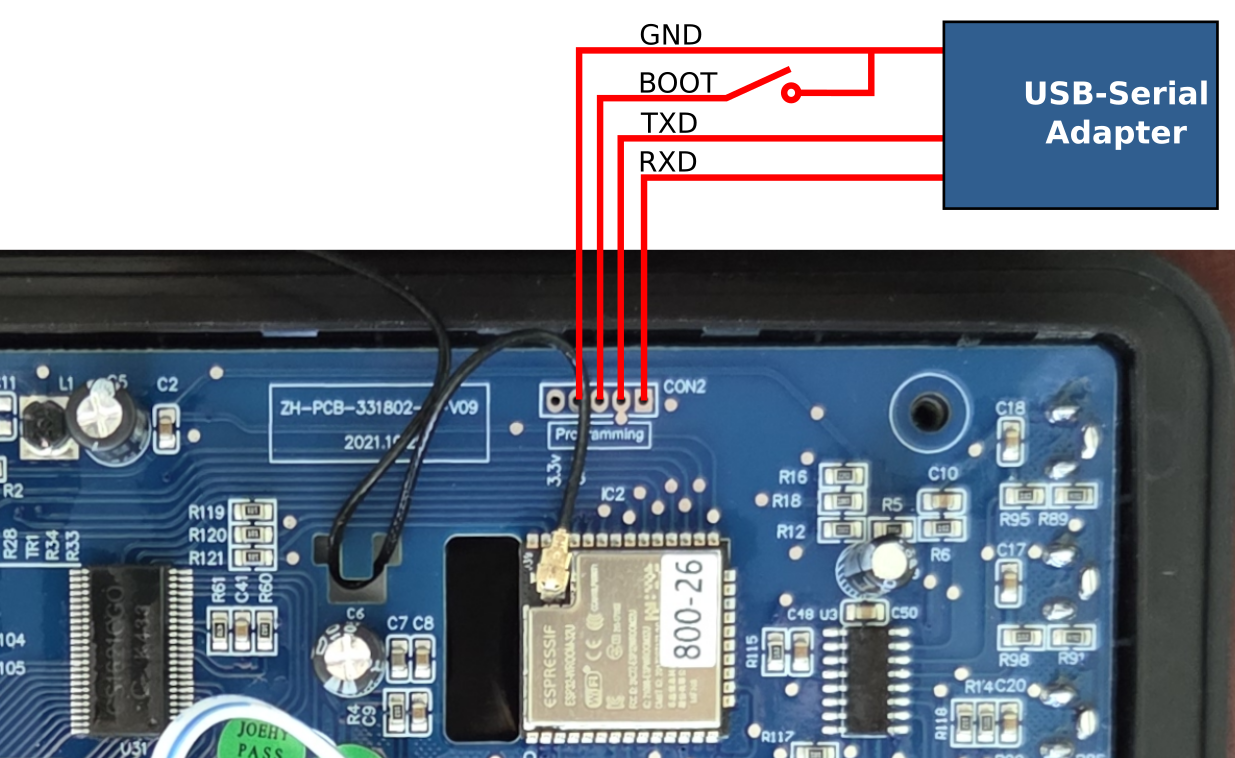
Once connected you can run the following commands to flash FreeFall 800 onto your controller:
-
Install espflash:
cargo install espflash --locked -
Back up current firmware:
espflash read-flash --port /dev/ttyUSB0 --baud 115200 --chip esp32 0 0x800000 firmware_dump.bin -
Tie “Boot Mode” pin (pin 4) on programming header to ground, then power up the controller from its normal power supply (the serial adapter does not power the board). Screen should stay blank.
-
Load firmware:
If you have already built the firmware from source, you can just run:
cargo run --releaseIf you are not building from source, download the latest “Firmware Image” from the repository release page. And then run:
espflash flash --erase-parts otadata --monitor --chip esp32 --port /dev/ttyUSB0 freefall_800_fw -
Release the
bootpin, and power controller off and back on. You should see the firmware booting in the console. You can now unplug programming header and device should run on its own.
Once you have initially flashed your controller with FreeFall 800, future firmware updates can be done over the network using the OTA firmware images, also available from the release page.
Connecting
If your controller had previously been connected to your network then FreeFall 800 should automatically reconnect to the same network when it starts up for the first time. However, if your controller was not connected to a network, or was connected to a network that is not present anymore, it will fall back to operating as its own WiFi access point, creating its own network with the name freefall_800_XXXXXX (where the Xs come from the device MAC address), and the password Gravity800.
Once your computer or phone is connected to the same network as the controller, point your browser at freefall800.local and it should load the FreeFall 800 web app:
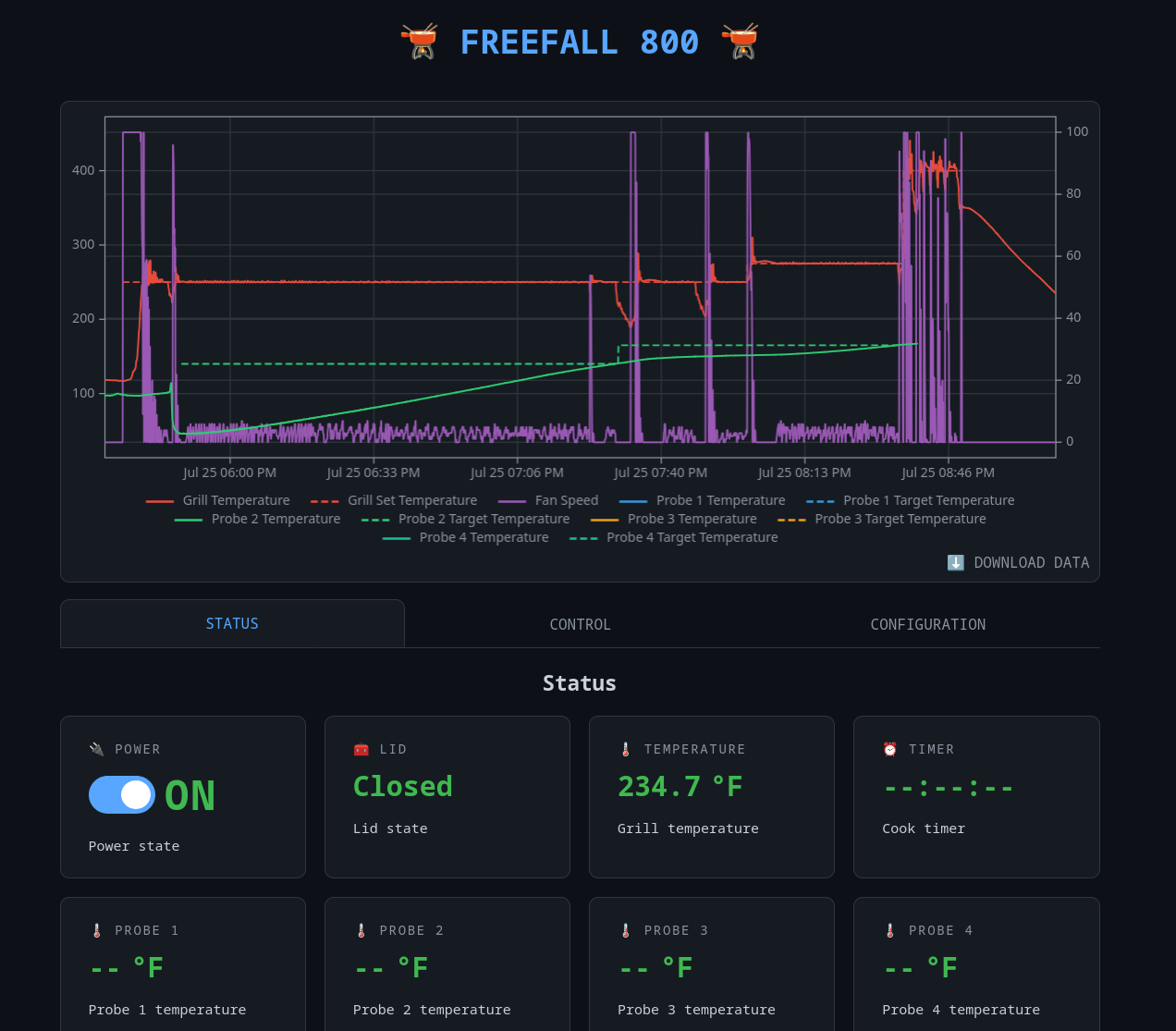
From here you can fully control the grill, monitor temperatures, set alarms, and configure the controller.
Of course the physical front panel controls still work as well. Not all the configurability available through the web app is possible through the front panel, but you can set the target and probe alarm temperatures and control the timer without opening the app.
Limitations
In its current v0.1.0 state, FreeFall 800 provides almost all of the functionality provided by the Masterbuilt app. But there are a couple of limitations:
-
FreeFall 800 cannot send notifications to connected devices when the timer expires or probe targets are hit. This is primarily a limitation of the web interface being a web-app, not a full mobile app. In theory web sites/applications can send notifications, but on most browsers this is limited to applications served over HTTPS, which is not really practical for this use case. To generate notifications I will likely need to create a real mobile app.
-
Because FreeFall 800 operates fully locally, you cannot access your grill from outside your local network, without extra effort. The Masterbuilt servers act as an intermediary for the factory firmware, so you can transparently control your grill from anywhere. There are of course options to tunnel traffic to your local network to work around this, but that is outside the scope of this project.
Future Work
There are, of course, so many things to be fixed and improved on this project going forward. Other than bug fixes and smaller improvements, these are some larger areas of improvement I would like to see:
-
Develop native mobile applications to connect with FreeFall 800 controllers. Mainly this is to allow for notifications to be generated for alarms, which I do miss having from the factory firmware. All control over FreeFall 800 is available through a JSON API, so no firmware changes would even be required to implement a native Android or iOS app. However, maybe the simplest solution would be to wrap the existing web app with some extensions in a simple mobile app shell.
-
More advanced temperature programming. The factory firmware only allows you to set a static temperature target, and this is what is implemented in FreeFall 800 as well. But now that the basics are implemented, it may be interesting to be able to program a temperature sequence, or even temperature ramps from the web app. I believe the temperature control PID loop could be made stable enough to allow for at least slow temperature changes.
-
Support for other Gravity series or Masterbuilt grills/smokers that use a similar controller. This one will need some community support, since I can’t justify actually buying the hardware myself. However, if anyone has other devices with similar model controllers and would like to help develop support for them, I would love a merge request!
Contributing
All source code for the project is available on the FreeFall 800 GitLab page.
If you try out FreeFall 800 and find bugs, have feature requests, or any other feedback. Please create an issue describing the bug or feature in the GitLab issue tracker.
Feel free to fork the repository and play around with the firmware! If you make improvements you think would be useful to the project as a whole, please open a merge request. I would love to see what others can do with this starting point.